@hyperledger/cactus-plugin-ledger-connector-fabric
This plugin provides Cactus a way to interact with Fabric networks. Using this we can perform:
Deploy Golang chaincodes.
Make transactions.
Invoke chaincodes functions that we have deployed on the network.
Summary
Getting Started
Clone the git repository on your local machine. Follow these instructions that will get you a copy of the project up and running on your local machine for development and testing purposes.
Prerequisites
In the root of the project to install the dependencies execute the command:
npm run comfigure
Compiling
In the project root folder, run this command to compile the plugin and create the dist directory:
npm run tsc
Architecture
The sequence diagrams for various endpoints are mentioned below
run-transaction-endpoint
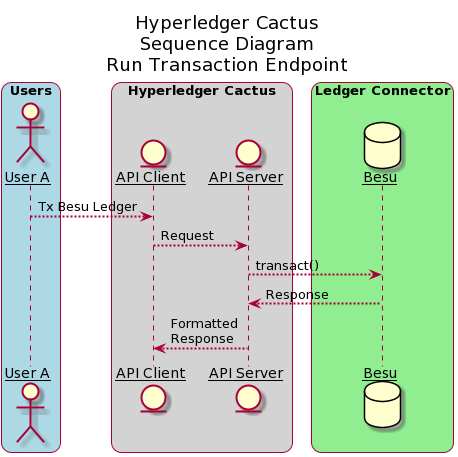 The above diagram shows the sequence diagram of run-transaction-endpoint. User A (One of the many Users) interacts with the API Client which in turn, calls the API server. API server then executes transact() method which is explained in detailed in the subsequent diagram.
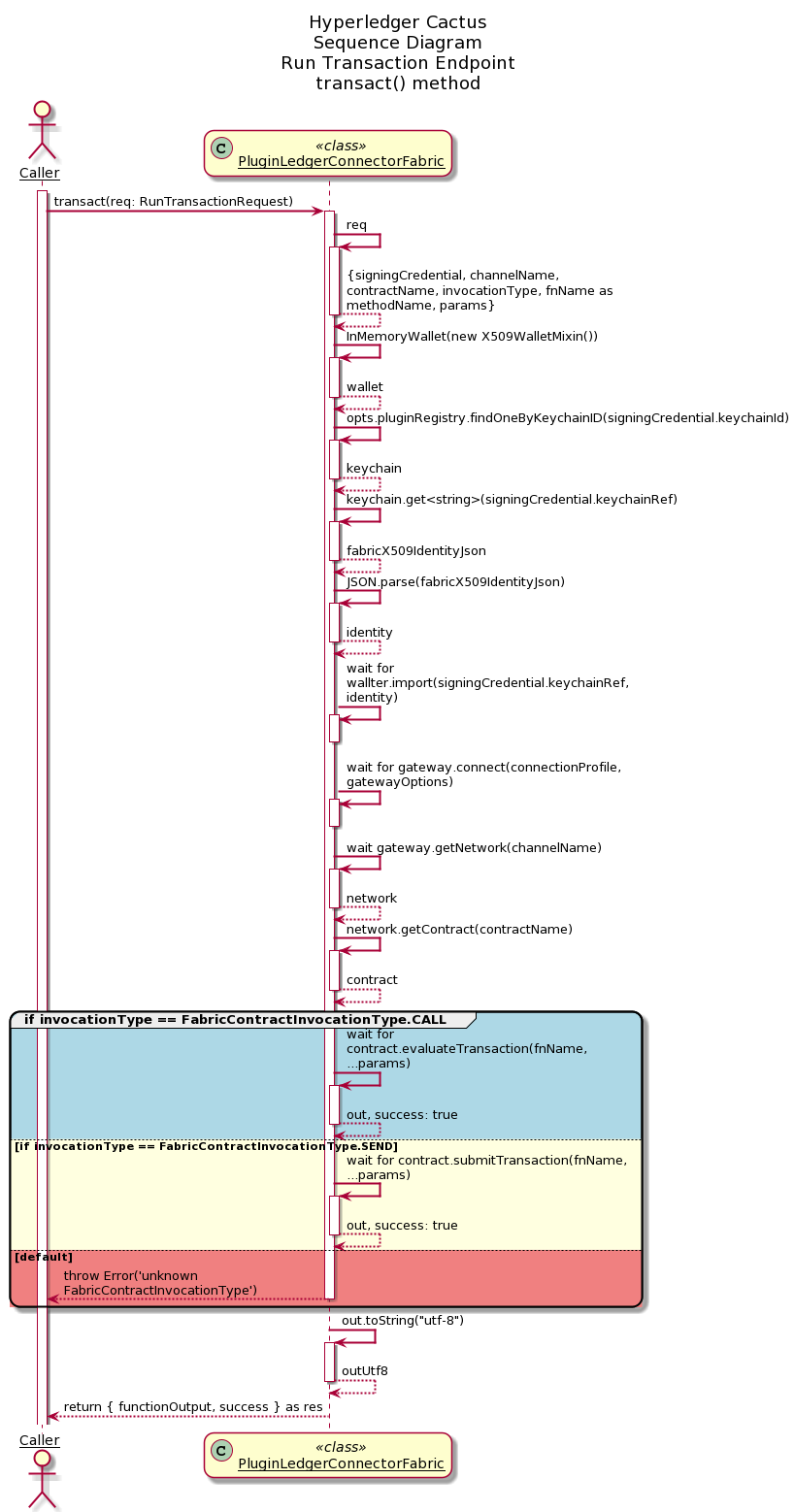 The above diagram shows the sequence diagraom of transact() method of the PluginLedgerConnectorFabric class. The caller to this function, which in reference to the above sequence diagram is API server, sends RunTransactionRequest object as an argument to the transact() method. Based on the invocationType (FabricContractInvocationType.CALL, FabricCOntractInvocationType.SEND), corresponding responses are send back to the caller.
Usage
To use this import public-api and create new PluginLedgerConnectorFabric and ChainCodeCompiler.
  const connector: PluginLedgerConnectorFabric = new PluginLedgerConnectorFabric(pluginOptions);
  const compiler = new ChainCodeCompiler({ logLevel });
For compile the chaincodes:
  const opts: ICompilationOptions = {
    fileName: "hello-world-contract.go",
    moduleName: "hello-world-contract",
    pinnedDeps: [
      "github.com/hyperledger/fabric@v1.4.8",
      "golang.org/x/net@v0.0.0-20210503060351-7fd8e65b6420",
    ],
    modTidyOnly: true, // we just need the go.mod file so tidy only is enough
    sourceCode: HELLO_WORLD_CONTRACT_GO_SOURCE,
  };

  const result = await compiler.compile(opts);
Extensive documentation and examples in the readthedocs (WIP)
Running the tests
To check that all has been installed correctly and that the pugin has no errors, run the tests:
Run this command at the project’s root:
npm run test:plugin-ledger-connector-fabric
Building/running the container image locally
In the Cactus project root say:
DOCKER_BUILDKIT=1 docker build -f ./packages/cactus-plugin-ledger-connector-fabric/Dockerfile . -t cplcb
Build with a specific version of the npm package:
DOCKER_BUILDKIT=1 docker build --build-arg NPM_PKG_VERSION=0.4.1 -f ./packages/cactus-plugin-ledger-connector-fabric/Dockerfile . -t cplcb
Running the container
Launch container with plugin configuration as an environment variable:
docker run \
  --rm \
  --publish 3000:3000 \
  --publish 4000:4000 \
  --env PLUGINS='[{"packageName": "@hyperledger/cactus-plugin-ledger-connector-fabric", "type": "org.hyperledger.cactus.plugin_import_type.LOCAL",  "options": {"instanceId": "some-unique-fabric-connector-instance-id", "dockerBinary": "usr/local/bin/docker","cliContainerEnv": {
    "CORE_PEER_LOCALMSPID": "Org1MSP",
    "CORE_PEER_ADDRESS": "peer0.org1.example.com:7051",
    "CORE_PEER_MSPCONFIGPATH":
      "/opt/gopath/src/github.com/hyperledger/fabric/peer/crypto/peerOrganizations/org1.example.com/users/Admin@org1.example.com/msp",
    "CORE_PEER_TLS_ROOTCERT_FILE":
      "/opt/gopath/src/github.com/hyperledger/fabric/peer/crypto/peerOrganizations/org1.example.com/peers/peer0.org1.example.com/tls/ca.crt",
    "ORDERER_TLS_ROOTCERT_FILE":
      "/opt/gopath/src/github.com/hyperledger/fabric/peer/crypto/ordererOrganizations/example.com/orderers/orderer.example.com/msp/tlscacerts/tlsca.example.com-cert.pem"
  },
  "discoveryOptions": {
    "enabled": true,
    "asLocalhost: true"
  }
  }}}]' \
  cplcb
Launch container with plugin configuration as a CLI argument:
docker run \
  --rm \
  --publish 3000:3000 \
   --publish 4000:4000 \
  cplcb \
    ./node_modules/.bin/cactusapi \
    --plugins='[{"packageName": "@hyperledger/cactus-plugin-ledger-connector-fabric", "type": "org.hyperledger.cactus.plugin_import_type.LOCAL",  "options": {"instanceId": "some-unique-fabric-connector-instance-id", "dockerBinary": "usr/local/bin/docker","cliContainerEnv": {
    "CORE_PEER_LOCALMSPID": "Org1MSP",
    "CORE_PEER_ADDRESS": "peer0.org1.example.com:7051",
    "CORE_PEER_MSPCONFIGPATH":
      "/opt/gopath/src/github.com/hyperledger/fabric/peer/crypto/peerOrganizations/org1.example.com/users/Admin@org1.example.com/msp",
    "CORE_PEER_TLS_ROOTCERT_FILE":
      "/opt/gopath/src/github.com/hyperledger/fabric/peer/crypto/peerOrganizations/org1.example.com/peers/peer0.org1.example.com/tls/ca.crt",
    "ORDERER_TLS_ROOTCERT_FILE":
      "/opt/gopath/src/github.com/hyperledger/fabric/peer/crypto/ordererOrganizations/example.com/orderers/orderer.example.com/msp/tlscacerts/tlsca.example.com-cert.pem"
  },
  "discoveryOptions": {
    "enabled": true,
    "asLocalhost: true"
  }
  }}}]'
Launch container with configuration file mounted from host machine:
echo '[{"packageName": "@hyperledger/cactus-plugin-ledger-connector-fabric", "type": "org.hyperledger.cactus.plugin_import_type.LOCAL",  "options": {"instanceId": "some-unique-fabric-connector-instance-id", "dockerBinary": "usr/local/bin/docker","cliContainerEnv": {
    "CORE_PEER_LOCALMSPID": "Org1MSP",
    "CORE_PEER_ADDRESS": "peer0.org1.example.com:7051",
    "CORE_PEER_MSPCONFIGPATH":
      "/opt/gopath/src/github.com/hyperledger/fabric/peer/crypto/peerOrganizations/org1.example.com/users/Admin@org1.example.com/msp",
    "CORE_PEER_TLS_ROOTCERT_FILE":
      "/opt/gopath/src/github.com/hyperledger/fabric/peer/crypto/peerOrganizations/org1.example.com/peers/peer0.org1.example.com/tls/ca.crt",
    "ORDERER_TLS_ROOTCERT_FILE":
      "/opt/gopath/src/github.com/hyperledger/fabric/peer/crypto/ordererOrganizations/example.com/orderers/orderer.example.com/msp/tlscacerts/tlsca.example.com-cert.pem"
  },
  "discoveryOptions": {
    "enabled": true,
    "asLocalhost: true"
  }
  }}}]' > cactus.json

docker run \
  --rm \
  --publish 3000:3000 \
  --publish 4000:4000 \
  --mount type=bind,source="$(pwd)"/cactus.json,target=/cactus.json \
  cplcb \
    ./node_modules/.bin/cactusapi \
    --config-file=/cactus.json
Testing API calls with the container
Don’t have a fabric network on hand to test with? Test or develop against our fabric All-In-One container!
Terminal Window 1 (Ledger)
docker run -p 0.0.0.0:8545:8545/tcp -p 0.0.0.0:8546:8546/tcp -p 0.0.0.0:8888:8888/tcp -p 0.0.0.0:9001:9001/tcp -p 0.0.0.0:9545:9545/tcp hyperledger/cactus-fabric-all-in-one:latest
Terminal Window 2 (Cactus API Server)
docker run \
  --network host \
  --rm \
  --publish 3000:3000 \
  --publish 4000:4000 \
  --env PLUGINS='[{"packageName": "@hyperledger/cactus-plugin-ledger-connector-fabric", "type": "org.hyperledger.cactus.plugin_import_type.LOCAL",  "options": {"instanceId": "some-unique-fabric-connector-instance-id", "dockerBinary": "usr/local/bin/docker","cliContainerEnv": {
    "CORE_PEER_LOCALMSPID": "Org1MSP",
    "CORE_PEER_ADDRESS": "peer0.org1.example.com:7051",
    "CORE_PEER_MSPCONFIGPATH":
      "/opt/gopath/src/github.com/hyperledger/fabric/peer/crypto/peerOrganizations/org1.example.com/users/Admin@org1.example.com/msp",
    "CORE_PEER_TLS_ROOTCERT_FILE":
      "/opt/gopath/src/github.com/hyperledger/fabric/peer/crypto/peerOrganizations/org1.example.com/peers/peer0.org1.example.com/tls/ca.crt",
    "ORDERER_TLS_ROOTCERT_FILE":
      "/opt/gopath/src/github.com/hyperledger/fabric/peer/crypto/ordererOrganizations/example.com/orderers/orderer.example.com/msp/tlscacerts/tlsca.example.com-cert.pem"
  },
  "discoveryOptions": {
    "enabled": true,
    "asLocalhost: true"
  }
  }}}]' \
  cplcb
Terminal Window 3 (curl - replace eth accounts as needed)
curl --location --request POST 'http://127.0.0.1:4000/api/v1/plugins/@hyperledger/cactus-plugin-ledger-connector-fabric/run-transaction' \
--header 'Content-Type: application/json' \
--data-raw '{
    channelName: "mychannel",
    contractName: "contract-example";
    invocationType: "FabricContractInvocationType.SEND";
    methodName: "example"
}'
The above should produce a response that looks similar to this:
{
    "success": true,
    "data": {
        "transactionReceipt": {
            "blockHash": "0x7c97c038a5d3bd84613fe23ed442695276d5d2df97f4e7c4f10ca06765033ffd",
            "blockNumber": 1218,
            "contractAddress": null,
            "cumulativeGasUsed": 21000,
            "from": "0x627306090abab3a6e1400e9345bc60c78a8bef57",
            "gasUsed": 21000,
            "logs": [],
            "logsBloom": "0x00000000000000000000000000000000000000000000000000000000000000000000000000000000000000000000000000000000000000000000000000000000000000000000000000000000000000000000000000000000000000000000000000000000000000000000000000000000000000000000000000000000000000000000000000000000000000000000000000000000000000000000000000000000000000000000000000000000000000000000000000000000000000000000000000000000000000000000000000000000000000000000000000000000000000000000000000000000000000000000000000000000000000000000000000000000",
            "status": true,
            "to": "0xf17f52151ebef6c7334fad080c5704d77216b732",
            "transactionHash": "0xc7fcb46c735bdc696d500bfc70c72595a2b8c31813929e5c61d9a5aec3376d6f",
            "transactionIndex": 0
        }
    }
}
Prometheus Exporter
This class creates a prometheus exporter, which scraps the transactions (total transaction count) for the use cases incorporating the use of Fabric connector plugin.
Usage Prometheus
The prometheus exporter object is initialized in the PluginLedgerConnectorFabric class constructor itself, so instantiating the object of the PluginLedgerConnectorFabric class, gives access to the exporter object.
You can also initialize the prometheus exporter object seperately and then pass it to the IPluginLedgerConnectorFabricOptions interface for PluginLedgerConnectoFabric constructor.
getPrometheusExporterMetricsEndpointV1 function returns the prometheus exporter metrics, currently displaying the total transaction count, which currently increments everytime the transact() method of the PluginLedgerConnectorFabric class is called.
Prometheus Integration
To use Prometheus with this exporter make sure to install Prometheus main component. Once Prometheus is setup, the corresponding scrape_config needs to be added to the prometheus.yml
- job_name: 'fabric_ledger_connector_exporter'
  metrics_path: api/v1/plugins/@hyperledger/cactus-plugin-ledger-connector-fabric/get-prometheus-exporter-metrics
  scrape_interval: 5s
  static_configs:
    - targets: ['{host}:{port}']
Here the host:port is where the prometheus exporter metrics are exposed. The test cases (For example, packages/cactus-plugin-ledger-connector-fabric/src/test/typescript/integration/fabric-v1-4-x/run-transaction-endpoint-v1.test.ts) exposes it over 0.0.0.0 and a random port(). The random port can be found in the running logs of the test case and looks like (42379 in the below mentioned URL)
Metrics URL: http://0.0.0.0:42379/api/v1/plugins/@hyperledger/cactus-plugin-ledger-connector-fabric/get-prometheus-exporter-metrics
Once edited, you can start the prometheus service by referencing the above edited prometheus.yml file. On the prometheus graphical interface (defaulted to http://localhost:9090), choose Graph from the menu bar, then select the Console tab. From the Insert metric at cursor drop down, select cactus_fabric_total_tx_count and click execute
Contributing
We welcome contributions to Hyperledger Cactus in many forms, and there’s always plenty to do!
Please review CONTIRBUTING.md to get started.
License
This distribution is published under the Apache License Version 2.0 found in the LICENSE file.